Eric is back home after two weeks in Manila, with a week of that presenting at the Beyond Planning: eProductivity conference. I am yet to debrief with him on how it went, but I wanted to share something that we did in getting ready. He had about 30 unique presentations to give over the 5 days of the conference, and for the first batch of those we wanted to run the slide decks past our advisory board (we ran out of runway to do them all like this). But when there is such a diversity of topics to be covered, and a similar diversity of interest among the advisory board members, how do you decide which slide decks to send to which people? I knew in broad terms their areas of interest, but I didn’t want to limit them to just those areas if they wanted to weigh in on others. And I didn’t want to send out 20 different slide decks by email.
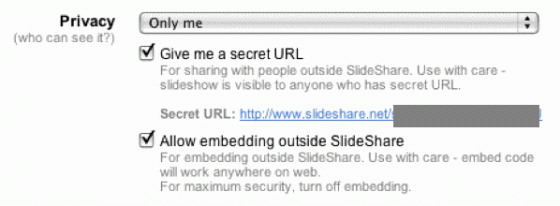
The solution I hit on was to set up a private, password-controlled blog under my TypePad account, and to upload all of the slide decks to SlideShare.net, ensuring that I turned on the private slide deck setting at SlideShare (a recent addition, and a fantastic one at that).
I embedded the slide deck into a blog post on the private blog, and used multiple categories on the blog post to flag the conference track (general, advanced, executive or student), the conference theme (eg, productivity methodologies, groups and teams, mindmapping, etc.), and the status of the slide deck (draft for review, or final ready to go). For example, the slide deck on how to be productive with email was flagged as “advanced track, executive track, productive email, draft for review”.
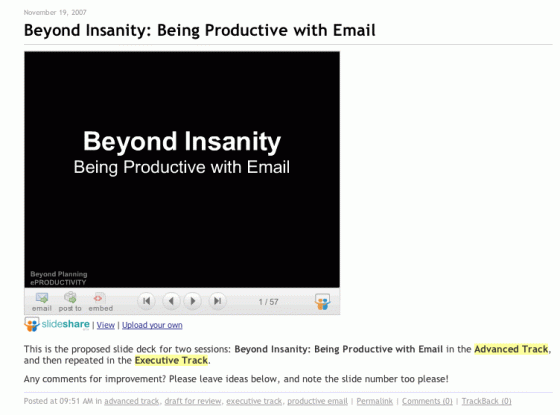
I sent out the address of the Planning Beyond Planning private blog, along with the user name and password, to the advisors, and asked them to review whatever they had interest in the moment for reviewing. For example, they could click on the “groups and teams” category in the category cloud, and see the slide decks that were available for review. They could quickly scan through the slides in the deck, thanks to the power of SlideShare, and then leave comments on the blog with recommended changes or additions. This also meant that subsequent reviewers could see the comments that others had made, and either weigh in with a “hear hear”, or give a counter perspective.
When a slide deck was presented by Eric at the conference, I updated the private blog to signal that we didn’t need any further comments–the window of opportunity had closed. This meant that I changed the status to “final ready to go”, and closed the comments on the blog post itself.
All in all, I think it worked really well, and I wouldn’t hesitate to follow this process again. And I would fully recommend that other conference advisors embrace a similar approach. Many thanks to SlideShare for the role that they played in making Eric’s conference a success!
And equally my thanks to the advisors that worked to make this such a success.
Categories: Conference Notes
 Michael Sampson