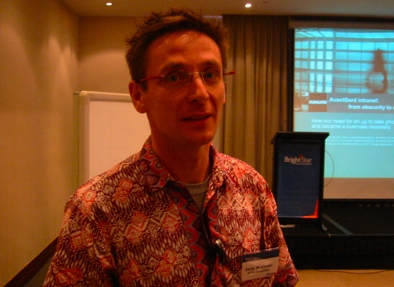
After a one-hour break for lunch (during which time I got to speak with Vivek, Richard and Ken), Dorje McKinnon from Sungard AvantGard took the stage to present a case study entitled From Phonebook to HR Information System. He’ll be presenting on AvantGard’s intranet evolution.
Opening Comments
“Dorje” is a Tibetan name, and like the Tibetan circle of life, Intranets go on forever. They are not a “project”.
Dorje’s goal is to provide a timeline and evolution of the AvantGard intranet. He wants to provide useful stuff for those embarking on an intranet, those for running intranets, and those overseeing them.
History and Evolution
In 1999, the Intranet looked disgusting (black background, green text). People were listed in 19 different Excel spreadsheets, but they convinced the Admin staff that it was better to work together. This required lots of ongoing training, especially when staff didn’t know a lot about Intranets. You need to “date” these people.
What they did:
(a) geek speak — relational database (“keep it simple”), reporting (extension list for each office, with an Excel spreadsheet download link for everyone, so they could download contact details to the phone), integrated logon (“a peg to hand user details on”; one per company, not per website). All of this lead to happy people — they could get access to all of their information, and they could edit their own profiles. We trust the people, so we didn’t see bad stuff going on.
(b) consider staff input into the Intranet
(c) go and listen to people about the problems they experience with the Intranet. Go to a different coffee room each day, and sit with different people at lunch.
The next couple of editions got rid of the black background, and made the UI easier to work with. Some applications were added to the intranet:
– The ability to apply for leave and to have those approved online. They extended this into a list on the right hand side of the Intranet to show when people were away “today” or “tomorrow”.
– Each time the home page is refreshed, a photo and profile link to a person is shown. This helps with opportunities to meet other people.
– Added the ability to apply for software licenses from the Intranet. Within the last 6 months, approval for this takes 20 seconds.
– They offer a compatibility search engine, for checking whether various software products will work together on the same machines or not.
– Linking car number plates to people’s profiles, so that when you’re stuck in the car park, you know how who to call.
About 2003, they faced some major issues: no executive sponsorship, no budget available, and more. One of the key questions was “are we normal?” We found StepTwo and their Intranet roadmap thinking, and found out that:
– we were mostly normal
– we avoided the redesign by failing to implement it; and
– we jumped into usability.
The internal Usability Engineer pointed out that the six phases of the Intranet don’t just apply to the whole Intranet, but to each of the six phases within the model.
Version 4.4 of the Intranet (current edition) has a cleaner look (quick links at the top which popups a list of common tasks so people don’t have to go through 6-7 clicks to get to major task actions, major story at the top, links on the left, etc.). Task actions include things like: lookup phone numbers, log IT requests, add car, request leave … these task lists are personalized to a job role, eg, a software developer, and information related to the person are contextualized / personalized based on their physical office location. On the bottom of the popup, there is a list of tools that are provided by the Intranet, eg, time sheets, leave requests, etc.
Successes
– Staff use it
– Simple and the same as other sources
– If it is unavailable for more than a few hours there is a direct business impact
– It is universally accessible, both inside and outside via HTTPS
Failures
Dorje, “we don’t talk enough about failures”
– Poor redesign decisions (“we really did a bad job, but we learnt from it”)
– The sales and marketing team wanted a portal, but due to lack of funding and their location in the US, Dorje couldn’t help. They did their own thing.
– The organization may not be set up for global management
– The office tag cloud tag size didn’t work, eg, a tag cloud that showed office locations in a cloud with the size of word dependent on the number of staff. The CIO hated the idea, because the smaller offices might be targeted for closure
Current Challenges
– It is too easy for staff to avoid the Intranet. Staff have traditional used various tools (eg, the Office suite), but there are newer applications that people can choose to use (eg, Google Docs & Spreadsheets, YouTube, etc.) Key takeaway: find some way of integrating these new tools into the Intranet.
– SharePoint 2007 is a bit of a challenge for AvantGard; they already had an intranet, so what’s the value of SharePoint? The solution: give SharePoint sites to specific teams and groups for collaborative activities, but leave the Intranet alone. There are manual processes for moving things from SharePoint to the wider Intranet place. Key takeaway: the new SharePoint is exceedingly complex. Get training on it.
– Intranets are like David Brent … own pearls (the Intranet has some good stuff), facilitate access (the Intranet is an entity that delivers information, but it is also a medium that provides a user interface to other resources)
– Dorje’s idea: staff will use whatever tools they have to solve problems. Dorje can’t make the Intranet as good as all the things that are available, eg, BaseCamp, Skype, more. Key idea: integrate the tools into the Intranet, eg, use the Zoom Search Engine to index these other places.
– On Enterprise 2.0, definitely take a look at Scott Gavin’s ‘What is Enterprise 2.0’ Slide Deck. Dorje argues that Enterprise 2.0 is “empowered people” plus “business value”.
Conclusion
It’s not about technology. Intranet use, but aren’t successful because of, technology.
If you are an Intranet sponsor … be open minded, invest in Intranets, there are soft and hard ROI benefits, and lead by example.
If you are an Intranet Manager … provide training, go and visit them, and support them in their activities.
Final plug: Check out the Kiwi Intranets Group (free to join, great for meeting like-minded people)
It’s not an impossible task!
Questions
1. (Ken) Are you using a CMS?
(Dorje) No, our Intranet is based on the old version of ASP. No CMS. We use FrontPage for authoring and editing content. Once people have login credentials, people are allowed to edit pages. Have never had problems with inappropriate content.
Audio Recording
We recorded Dorje’s Speech (38MB)
Categories: Conference Notes
 Michael Sampson